Complete a job without counting stock twice
Updated 2026-09-22A finished job should leave two clear records: what the workshop used and what it earned. Start by choosing the steps a job can follow, then decide which steps record stock and income. This guide walks through both, with examples for a workshop that prints, paints and checks each part before delivery.
1. Check the workshop workflow
New workshops deduct stock at Ready and also check for any unrecorded stock at Completed. Completed also records income. If you already use Kraftius, your saved workflow stays unchanged.
- As an administrator, open Settings → Workflow.
- If you see “Complete stock booking”, read the explanation and choose “Enable for Completed”.
- Review the status settings, then save the workflow. This changes future status entries; it does not replay old jobs.
- Custom statuses keep their own automation switches. Recording income and deducting stock are independent choices.
2. Separate allowed moves from automatic actions
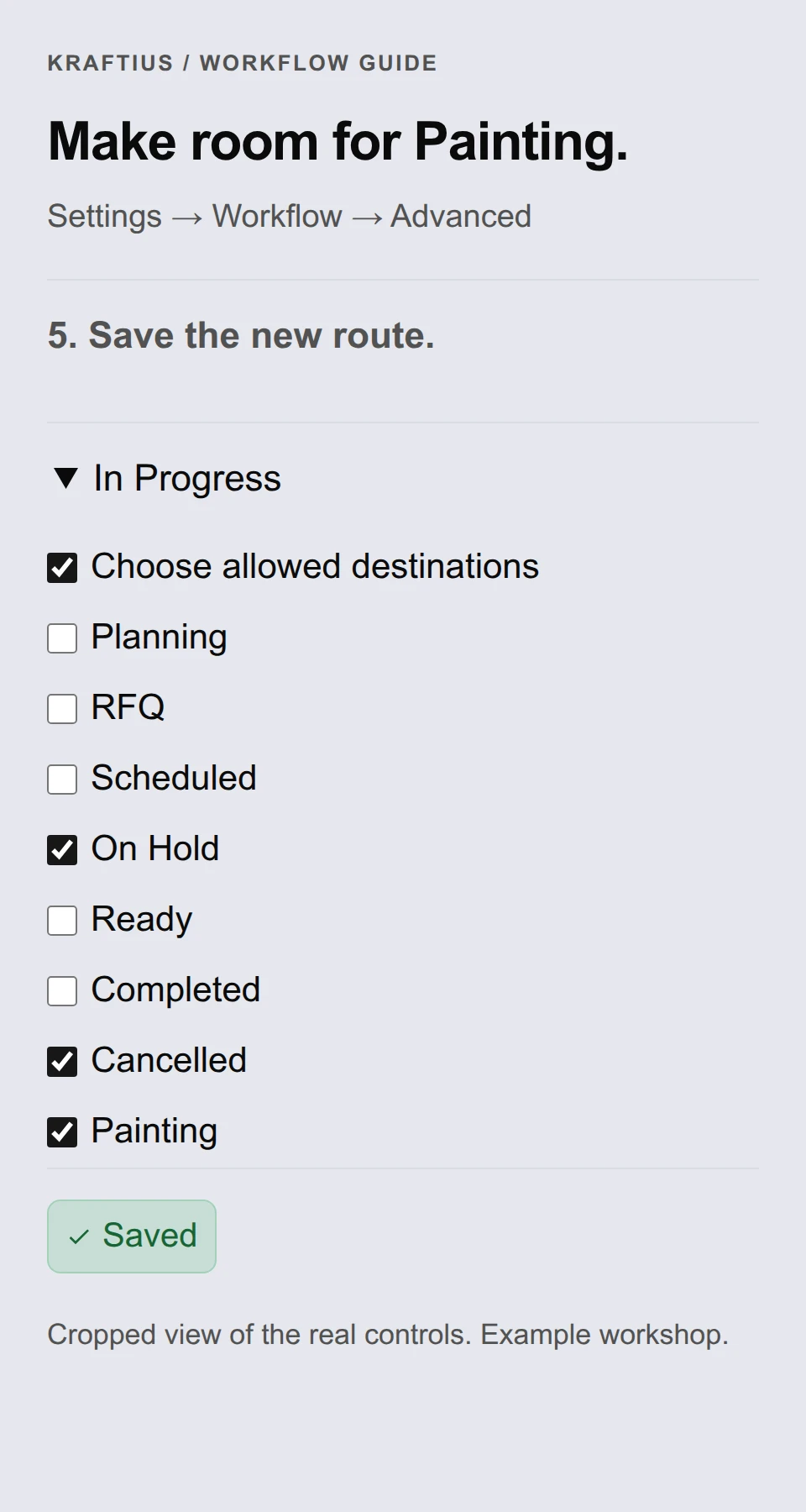
An allowed transition answers “Where can this job go next?” A status behavior answers “What happens when it gets there?” Configure these separately in Settings → Workflow → Advanced: status behavior. Allowing a move into Painting does not, by itself, deduct material or record income.
Built-in statuses start with a default set of allowed moves. For example, In Progress can move to On Hold, Ready, Completed or Cancelled. A custom status without its own restrictions can move to any other configured status. Adding Painting does not automatically make it reachable from In Progress; configure that incoming move too.
Reordering the status rows changes their display order only. Renaming a status also keeps its identity and existing connections. Moving Painting between In Progress and Ready on screen does not create a rule between them.
- Expand a status under “Allowed transitions”. The summary shows its current destinations.
- Turn on “Choose allowed destinations” to edit that status’s outgoing moves. The checklist starts with its current allowed moves, so remove any you do not want to keep.
- Turn that option off to use the default rules again. Leaving it on with every destination unchecked means no outgoing transitions, not a return to defaults.
- Choose “Save Changes” to apply the edited workflow. Saving rules does not move existing jobs or replay their stock and income actions.
3. Example: require painting and a quality check
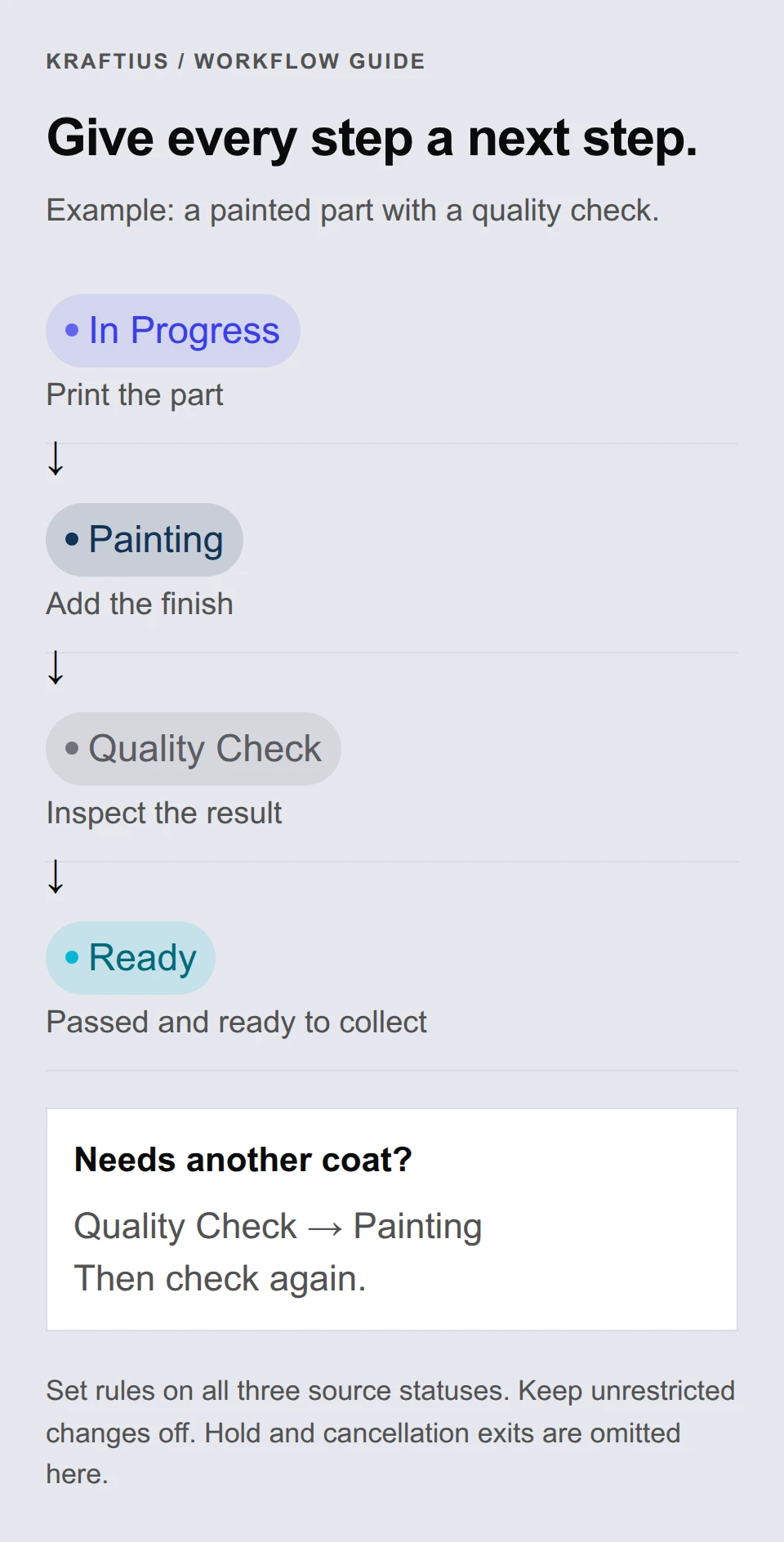
Suppose every printed part must be painted and checked before it is ready for collection. Keep the built-in In Progress and Ready statuses, then add Painting and Quality Check. These are example names you choose for your workshop.
For this example, leave “Unrestricted status changes” off. Configure all three source statuses below, including In Progress. If you only restrict Painting and Quality Check, the default In Progress rules would still let someone skip both and move straight to Ready or Completed.
- On each of these three rows, turn on “Choose allowed destinations” and select exactly the destinations shown. Leave the other statuses on their defaults for this example.
- Keep stock deduction on Ready and income recording on Completed if that matches your workshop. Leave those actions off on Painting and Quality Check; the checks guide the work without recording it early.
- After saving, a job in In Progress offers Painting but cannot move directly to Ready or Completed. The status menu, project editor and board use the same rules.
- If the check fails, return the job to Painting. Neither of these example custom statuses posts stock or income, so this loop records neither.
4. Example: reopening and unrestricted changes
Completed normally allows a return to Planning. To keep that route, leave its rules at their default. To make Completed a stopping point for ordinary status moves, turn on “Choose allowed destinations”, clear every destination and save. The job still displays its status, but has no status-change menu while no moves are available.
A rule permitting reopening does not reverse the job’s records. Completed → Planning does not put material back on the shelf, delete income or unlock quantities that have already been recorded. Use a stock adjustment or ledger correction for those changes, as described later in this guide.
“Unrestricted status changes” overrides both default and custom transition rules. While it is on, a job can move to any other configured status, even out of a status with an empty destination list. Saved rules remain in place and apply again when you turn unrestricted changes off. It is a workshop-wide setting, not an exception for just one job.
These rules govern moves of existing jobs. A new job, including a branch, can start in any configured status. Starting it directly in Ready or Completed still runs that status’s enabled actions. A required sequence therefore guides transitions; it does not prove that every newly created job has passed through each step.
5. Deleting a status without losing the job
Deleting Painting removes it from the configured destinations and removes explicit links pointing to it. Review the affected source rows before saving: if Painting was a row’s only destination, that row now has no outgoing moves. Kraftius does not invent a replacement route.
Use the Restore button beside the removal notice before saving to undo the deletion. It restores the status, its behaviors and its connections to statuses still present. A successful save clears this session’s Undo history. Restoring missing built-in statuses later gives them their defaults; it cannot recover a deleted custom configuration.
Existing jobs keep their previous status even after that status is removed. A job still in the removed Painting status can move into any currently configured status, so it is not stranded. That recovery move can run the destination’s stock or income actions: review the job before choosing Ready or Completed.
6. Check the job before recording it
Confirm the materials and quantities on every bed, the number of runs, and any additional hardware. Material quantities use the inventory material’s waste allowance when stock is deducted. Hardware linked to an inventory item deducts that item; custom text-only hardware has no stock link.
- Check the quote and any extra services.
- For internal or other non-billable work, select the option to exclude the job from income before recording stock or income.
- Check available stock. Kraftius currently stops stock at zero rather than recording a negative balance. The movement records the actual deduction, so a shortage still needs your attention.
7. Mark the job Ready or Completed
Ready deducts stock when that behavior is enabled. Completed records income when enabled and deducts stock if the completion stock setting is enabled and stock has not already been processed. If your transition rules allow a move straight to Completed, it follows those same settings.
A job already processed at Ready is not deducted again at Completed. Starting a new job directly in an automated status also applies its configured stock and income actions.
The job save and these actions succeed together. If the save reports a posting failure, the changes are rolled back. You can retry the save.
8. Check the records
Review the item’s stock history and the Business ledger. Automatic income uses the customer total including applicable tax, rather than an editable cached total. Internal jobs and zero-value jobs can complete without adding an income entry.
An income entry records what the job sold for. It is not evidence of payment, so use it to read the workshop’s turnover rather than as proof a customer has settled.
The project remembers that these actions were processed even when there was no amount to record. Reopening it or deleting the automatic income entry does not trigger a new entry.
9. A worked example
This is a sample job with invented numbers, not a real workshop’s records. Every rate below is a setting someone chose; none of them is a Kraftius default, and the tax rate is illustrative rather than advice.
The job is two runs of a printed bracket, priced in euros. Its sample settings are a 5% waste allowance on the material, a 50% margin, and 20% tax with the job not marked tax-exempt. There is no labour, setup fee, rush charge, extra service, manual override or discount.
- Starting stock: 1,000 g of PLA, bought at €0.02/g and sold at €0.03/g.
- Each run uses 100 g and takes 2 hours; the bed is set to 2 runs.
- The printer has a manual rate of €3.00 per hour, which already includes its electricity allowance.
- Four threaded inserts are linked for the whole job at €0.50 each, from a stock of 20.
10. What the example records, step by step
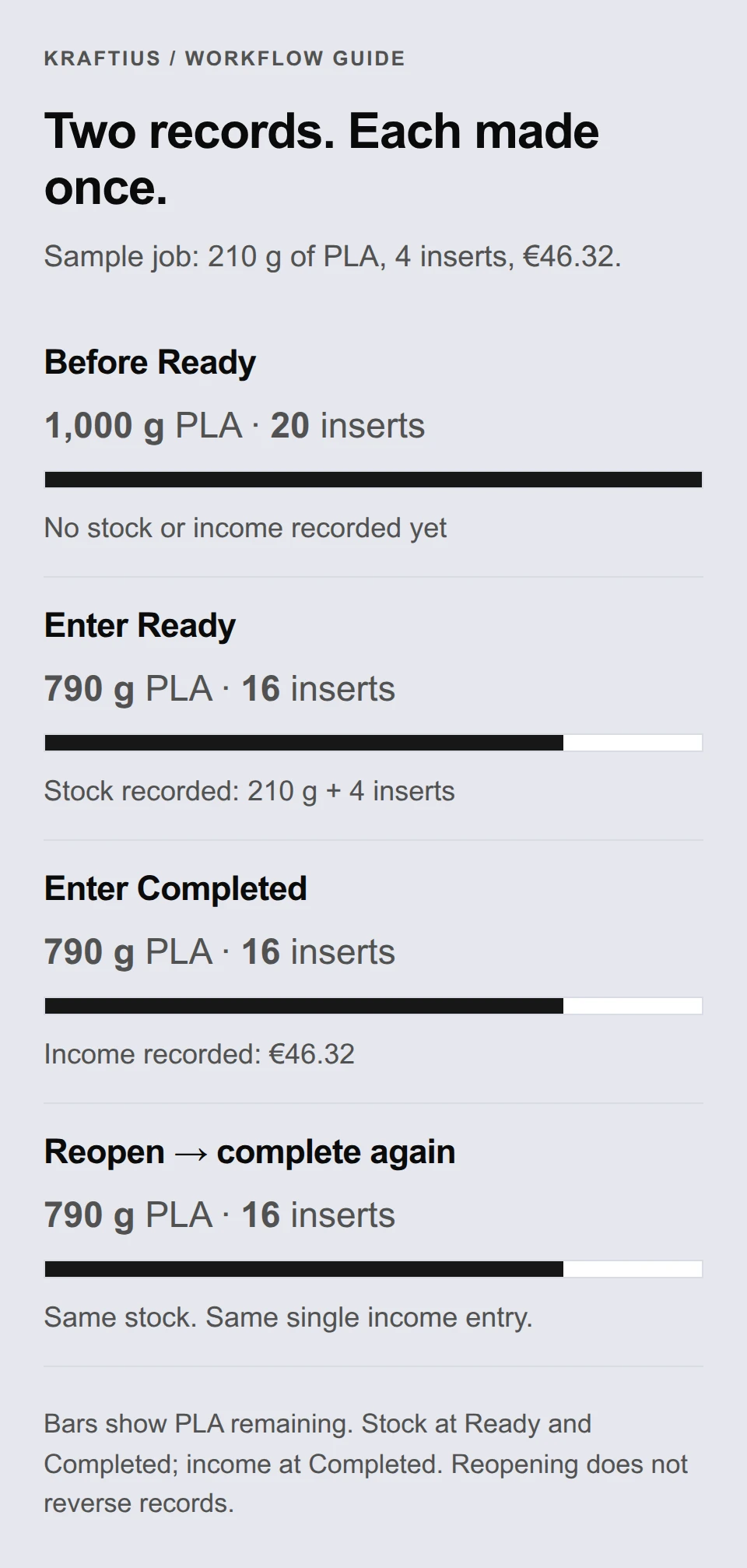
The waste allowance is one lever applied to both sides: the workshop is charged for 210 g and 210 g leaves the shelf, so the quote, the cost and the stock record reconcile.
Margin applies to machine time and material only. The four inserts are added afterwards at what they cost, so they earn nothing — which is why €36.60 becomes €38.60 rather than being marked up again.
- Stock moves once, at Ready. Completing the job afterwards checks for anything unrecorded and finds nothing left to do.
- Income appears once, at Completed, and is the customer total including tax — €46.32, not the €38.60 shown before tax.
- When the transition is allowed, going straight to Completed with completion stock enabled gives the same balances and the same single income entry: 790 g, 16 inserts, €46.32.
- Reopening the job and completing it again repeats neither. The job remembers that each step was processed.
11. Three exceptions worth knowing
The same job behaves differently in three situations that come up in ordinary use.
- An internal job marked to be excluded from income still consumes its 210 g and 4 inserts, but adds no ledger entry.
- If only 150 g were on the shelf, the deduction stops at zero rather than going negative, and the movement records the 150 g actually taken — so a shortage still needs your attention.
- Correcting a finished job means an explicit stock adjustment or ledger correction, not editing its recorded quantities. Extra production is a new job.
12. What an assigned operator sees
Before stock or income is recorded, an operator assigned to this job, with pricing hidden, can update the details they are responsible for, including notes, scheduling, progress and the number of inserts used. After recording, the quantities stay fixed. They cannot see the €46.32 total, the rates behind it, or the margin, and saving the job back does not overwrite the prices an administrator set.
That operator also cannot reach a job in another workshop, or one in this workshop they are not assigned to, whether by opening it directly or by asking for it by name.
13. Correct a mistake explicitly
Once stock or income has been recorded, the job’s quantities and pricing inputs are fixed. Reopening it does not undo the stock movement, reverse income, or unlock those inputs. You can still change notes, scheduling and progress.
Use an explicit stock adjustment or ledger correction for a recording mistake, and include a note explaining why. For extra production, create a new job. Moving beds out of an already-recorded job is blocked because it would change the job behind the existing records.
Older jobs with incomplete or missing history need review during the release. An empty history does not prove that stock was never used or income was never recorded.